Frequently Asked Questions
Everything you need to know to start blazing chunks.
Getting started
Where do I download and play ChunkBlazer?
Can I play ChunkBlazer on any account?
Can I start in any Chunk?
Do I have to stay on Tutorial Island to be a Competitive account?
Competitive & Casual
What is the difference between Competitive and Casual?
Competitive players are Ironmen (of any type, including Group Ironmen) who start both their account and their ChunkBlazer journey in Lumbridge.
Casual accounts are any accounts where at least one of these is true:
- It's an already existing account.
- It's not an Ironman.
- Its ChunkBlazer journey starts in a chunk other than Lumbridge.
How do I qualify for Competitive Mode?
- Combat level 9 or lower, with Hitpoints 15 or lower
- Every non-combat skill at level 3 or lower
- Be an Ironman, Hardcore Ironman, Ultimate Ironman or Group Ironman. Group Ironmen have their own leaderboard category.
I didn't realize I had to pick Competitive. Am I stuck on Casual unless I remake?
Points & chunks
How do I earn Points?
How do I buy Chunks?
Can I unlock chunks I can only reach by teleporting or sailing?
Not directly. You must own a neighboring Chunk to buy a new Chunk bordering it.
To check whether you have a valid path, try unlocking the chunk from the World Map. If the World Map lets you unlock it, the chunk is yours to use, and you can enter it however you like, teleports included. Building off of Free Chunks, or walking there by unlocking a path of adjacent chunks, are the easiest ways to get somewhere new.
Can I go into Locked Chunks for things I need?
Why are some chunks free?
A chunk is free for one of two reasons:
- It's a port with a charter ship. Charter ships let you get around the map and unlock more chunks. See Charter Chunks below.
- It doesn't have enough unique content for a good set of tasks. These are mostly ocean and coastal chunks, with a handful of exceptions.
Notable exceptions are the chunks with The Royal Titans, Wintertodt, and Vardorvis. The tasks for those bosses live in a nearby, related chunk.
Why aren't free chunks unlocked automatically? Should I avoid unlocking them?
What are "Charter Chunks"?
What are Boss Tokens?
Syncing & devices
What is Server Sync?
How do I play across multiple devices?
There are two ways to keep your ChunkBlazer progress and sync key on more than one computer.
Automatic: RuneLite Cloud Sync + Login
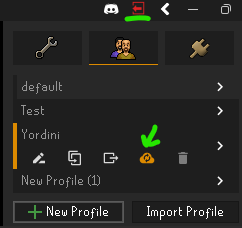
- Log into your RuneLite account on every computer you play on, using the account button at the top of the RuneLite sidebar.
- In RuneLite's configuration panel, open the Profiles tab and turn on cloud sync for the profile you play on (the cloud icon).
- Use that same profile on each computer. Your ChunkBlazer settings and sync key come along automatically.
Manual: copy your sync key
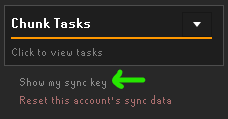
- On your first computer, click Show my sync key at the bottom of the ChunkBlazer side panel and copy the key.
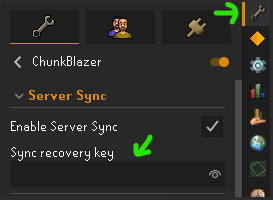
- On your other computer, while logged out of the game, paste it into Sync recovery key in the ChunkBlazer config (the wrench, top right).
- Log in. Chat will confirm the key was accepted.
Keep your sync key private. Anyone with it can sync progress to your account.
Can I play on mobile? What happens to my progress?
Yes, you can play on mobile, but ChunkBlazer is a RuneLite plugin, so try to play on RuneLite with the plugin on as much as you can.
Some things you do on mobile will be picked up once you're back on RuneLite, like level progress, or having an item for an obtain or equip task. But if you do something on mobile that can't be checked later, for example getting and then using up a quest item that has a task, you won't get the points for that task.
Greying out locked chunks
How do I get my locked chunks greyed out?
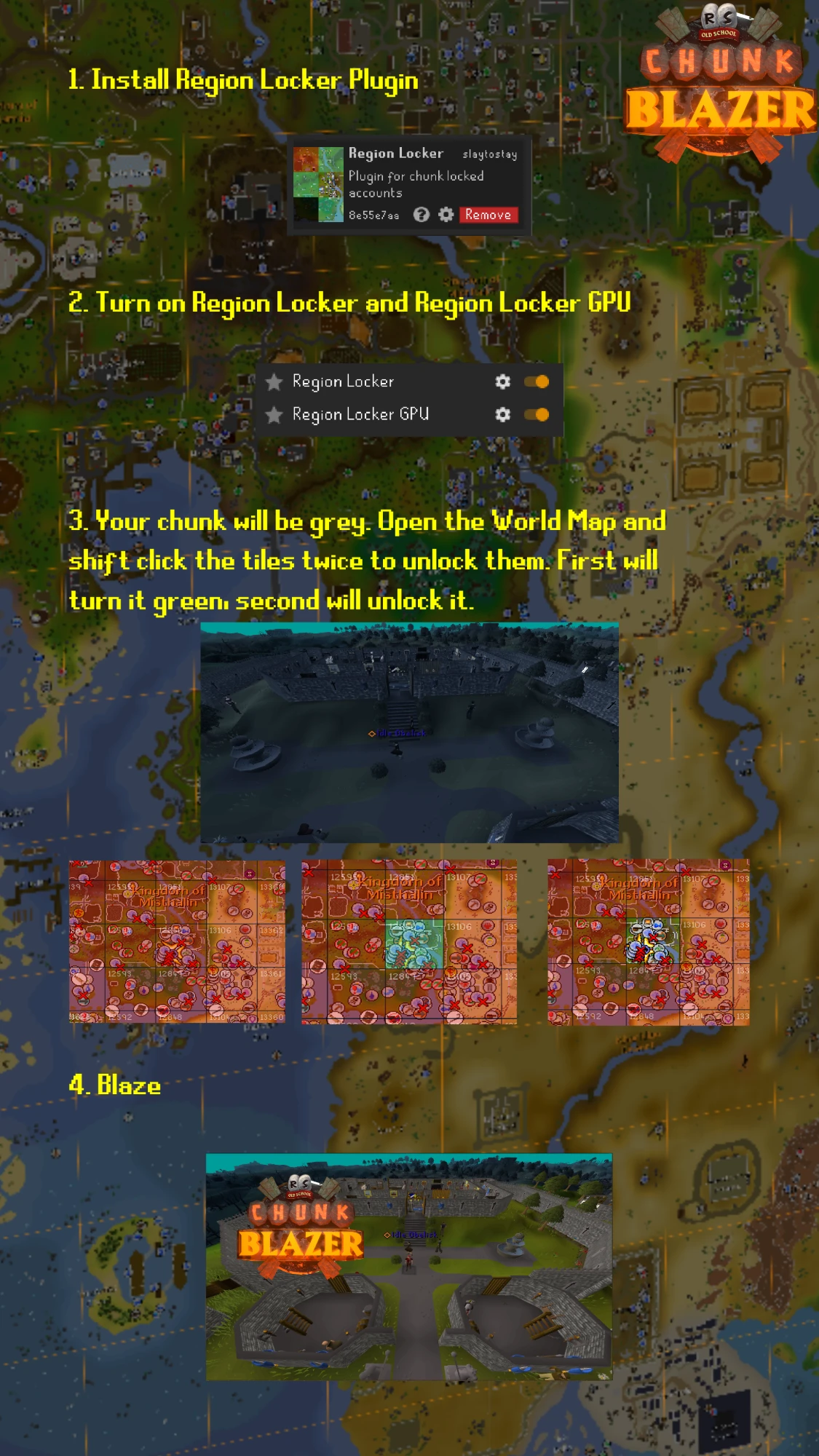
ChunkBlazer's own greyed-out chunks are waiting on RuneLite to finish their GPU API. In the meantime, you can grey out locked chunks with two other Plugin Hub plugins: Region Locker and Region Locker GPU. This works with RuneLite's regular GPU plugin.
- Install the Region Locker plugin from the Plugin Hub.
- Turn on both Region Locker and Region Locker GPU.
- Your chunk will be grey. Open the World Map and shift-click a chunk twice to unlock it in Region Locker: the first click turns it green, the second unlocks it.
- Blaze!
In Region Locker's settings, turn off "Draw region IDs" and change its unlock hotkeys. ChunkBlazer already draws region IDs, and the default hotkeys overlap with ChunkBlazer's.
I use 117 HD. How do I grey out locked chunks?
You still need Region Locker, but do not turn on Region Locker GPU. Use the Locked Chunk Overlay plugin instead. Guide courtesy of Volatar (Chunkatar).
Region Locker settings
- Turn off "Draw region IDs". ChunkBlazer already draws these and they overlap.
- Change the unlock hotkeys. The defaults overlap with ChunkBlazer's.
- Optional: turn on "Draw chunk border lines". It's helpful to see.
Locked Chunk Overlay settings
- Set "Overlay Darkness" to moderate (suggested, adjust to taste).
- Turn on "Darken screen".
- Set "Chunk Source" to Region Locker.
If the overlay stops updating, turn the Locked Chunk Overlay plugin off and back on.
Roadmap
When will Sailing or more tasks be added?
Not for the foreseeable future. ChunkBlazer is still a new plugin with plenty of content, and there are other important changes and fixes to finish first.
Sailing also works differently from the rest of the game, and Jagex themselves are still tweaking it. It's a massive undertaking, so it's shelved for now.
Because of this, we're not accepting task suggestions until we're ready to start adding to the task lists.
Will there be a Free-to-Play mode?
Help & community
I've found a bug and/or I have a problem with the plugin.
How can I join the ChunkBlazer Clan?
Still stuck? Join our Discord →